
iClassPro guides
How to use a gift certificate to add credit to your iClassPro account
By in2tennis admin ·
- 1
Access your iClassPro account
Log in to your iClassPro account using your credentials.
- 2
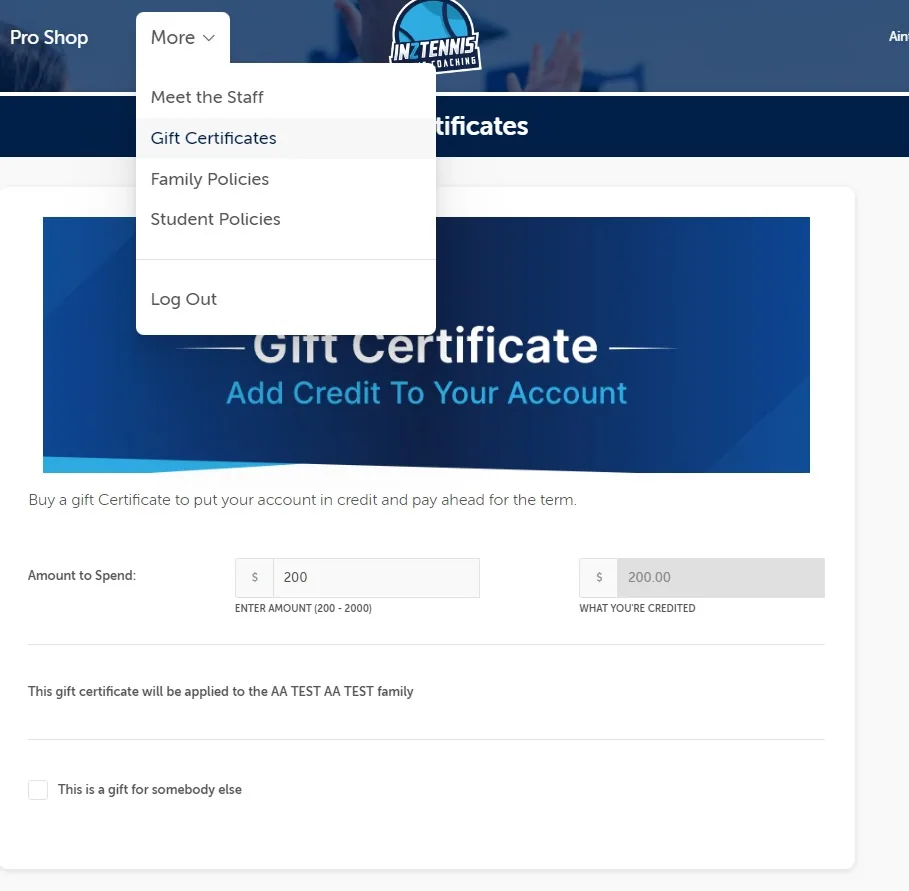
Locate the Gift Certificate section
Look for the “More” section and open the drop-down to find “Gift Certificate”.
- 3
Enter the amount you want to top up
You'll be prompted to enter the amount of credit to add. The minimum top-up is $200.
- 4
Apply the gift certificate
Click Apply or Redeem. iClassPro verifies the code and applies the credit to your account balance immediately.
- 5
Manage your account balance
View your updated balance in real time. The amount added will be deducted from your next invoice or monthly billing cycle.
Important: if you have direct debit set up, iClassPro will use your credit balance first. Once the credit is exhausted, any remaining balance is charged via your direct debit method.